 IP Lens
Write down the intended change
Before testing, collect the new host’s documented IPv4, IPv6 or alias targets. Do not assume that the old and new hosts use the same addresses. Note whether you changed a DNS record within the same zone or changed nameservers and delegation.
List the root name, www and any application subdomains affected by the move. Mail may use different infrastructure: a website migration does not automatically require changing MX or TXT records. Save the previous configuration so that you can describe exactly what changed.
Query the exact names and record types
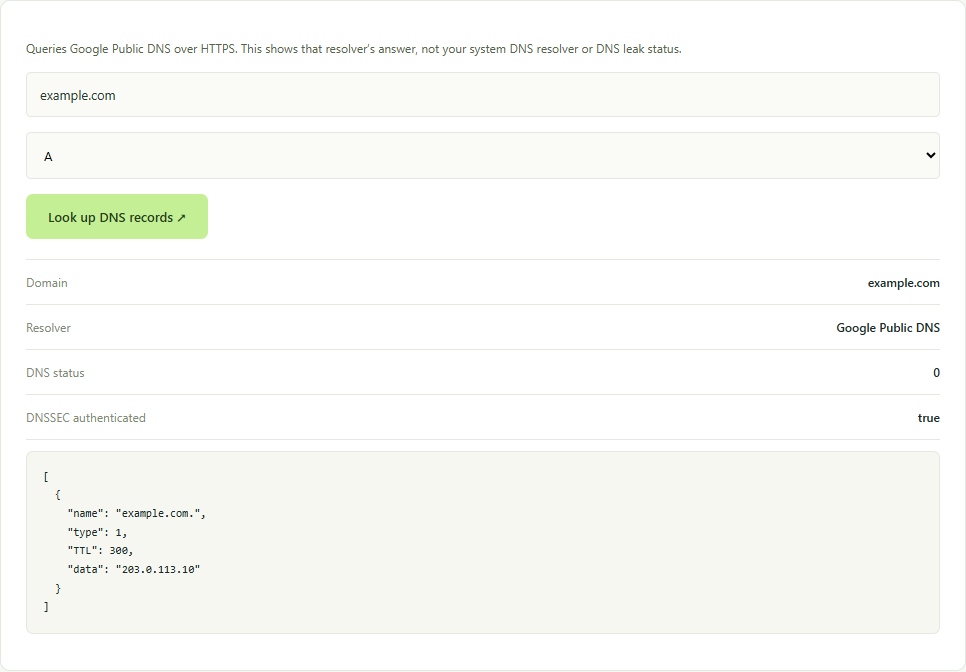
- Open DNS lookup, enter the root domain, select A and run the query.
- Repeat for AAAA. A stale IPv6 address can remain even if the IPv4 answer points to the new host.
- Check www separately. If it is an alias, inspect its CNAME target and then query the target’s addresses.
- If you changed DNS providers, inspect NS and compare the delegation with the provider’s instructions. This tool’s public resolver answer is not a direct query to every authoritative server.
- Record DNS status, answers, TTL, resolver and time. Repeat the relevant query later instead of making several unrelated changes.
Example of the tool in use
Separate caching from other failures
TTL is associated with cached answers; it is not a universal timer shared by all users. An earlier record may have been cached under its earlier TTL. One public resolver answer does not establish that every resolver has refreshed.
An empty answer needs its DNS status and requested type. NXDOMAIN concerns a name that the resolver reports as nonexistent, while a successful response may have no record of a particular type. A browser timeout may instead prevent the DNS request from completing at all.
If A and AAAA match the intended host but the website still fails, investigate the host’s domain binding, certificate, HTTP redirect and application configuration. Correct DNS does not itself prove a working TLS certificate or application.
Make one correction based on the evidence
Correct an unintended address or alias in the authoritative configuration you control. Review the new host’s requirements before removing an AAAA record; do not disable an address family merely because one request timed out.
Use the IPv6 connectivity test for browser reachability and IP lookup for network ownership context. Read the record-type guide before interpreting MX, TXT or the DNSSEC AD flag.
Protocol reference
The browser query uses the documented Google Public DNS JSON interface. Its response describes that resolver’s observation, not your operating system’s configured DNS path.