 IP Lens
Identify which location is unexpected
Record the address and the city reported by the lookup provider. Confirm that the input is empty when using your current IP, rather than a domain or someone else’s address left in the form. A lookup of a website describes the selected server address, not the visitor.
A city can be unexpected even when the IP itself is correct. The address belongs to a network allocation, and the provider estimates a location from its records. A mobile carrier, office gateway or VPN can make the public exit differ from your position. That is different from a browser request returning another address.
Compare the right fields in order
- Open IP address lookup, choose Use my IP and note the source and time.
- Open the IPv6 test if other services show a different address. Record IPv4 and IPv6 separately.
- If you want a device reference, return to IP lookup and choose Get device location. Grant permission only if you want to share location signals with your browser or OS positioning service.
- Compare device coordinates and their accuracy radius with the approximate IP map. Keep these two results separate.
Device location is optional and can fail or have a broad accuracy radius. A denied permission does not affect IP lookup. The device coordinates are excluded from downloaded IP Lens reports.
What the tool looks like
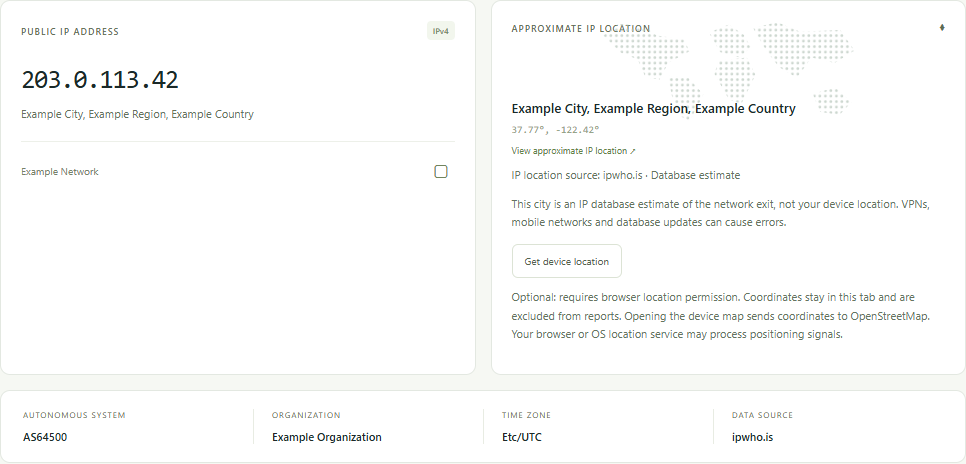
Interpret the difference without guessing
If the IP changed, investigate routing, VPN state or the address family before discussing city accuracy. If the same IP has different city labels across services, you have a database disagreement, not proof that one service has located your house.
If the device estimate is much more precise than the IP map, that still does not update the IP provider’s record. A map coordinate can look exact while representing only a network area. IP Lens rounds displayed IP coordinates and does not plot missing or invalid values.
Choose a useful next action
When the city matters to an account or service, ask that service how it determines region rather than assuming it uses the same provider. For a database correction, contact the source displayed in the result with the relevant IP and field. Do not publish an entire report when a minimal example is enough.
Read how to interpret ASN and organization labels or use the VPN comparison checklist when the exit itself appears wrong. An IP city is not a reputation score or proof of VPN use.